Identify ecommerce customer pain points by extracting themes from your own reviews and support tickets, ranking them by volume and revenue impact, and separating actual product problems from operational ones. Generic "slow shipping" listicles don't help; your dataset does.
Most articles about customer pain points in ecommerce read like they were written without ever looking at a real dataset. "Slow shipping." "High prices." "Unclear return policies." You already know these exist. The question is: which customer pain points in ecommerce are actually hurting your store, and how bad are they?
This guide takes a different approach. Instead of listing generic ecommerce customer complaints, we'll walk through how to pull the real pain points out of your own reviews, support tickets, and survey responses - so you can make product and CX decisions based on your customers, not a blog post's hunches.
What Counts as a Customer Pain Point
A customer pain point isn't just a complaint. It's a recurring friction that costs you money - in returns, churn, lost repeat purchases, or support load. One angry review about sizing is feedback. Thirty reviews mentioning the same sizing issue, combined with a 14% return rate on that SKU, is a pain point.
The distinction matters because most ecommerce teams treat every complaint as equally urgent. They're not. Pain points have three attributes:
- Frequency. How many customers mention it? Not in raw counts, but as a share of feedback about that product or category.
- Severity. How badly does it affect the customer experience? A late package that still arrives is different from a defective product that needs to be returned.
- Leverage. How much would fixing it move your business metrics? A sizing fix that cuts 3% off your return rate beats a packaging tweak that saves pennies.
When you identify customer pain points in this way, you end up with a short, ranked list of things worth fixing - not a long list of things you might someday address.
Where Customer Pain Points in Ecommerce Actually Live in Your Data
Your data already knows your pain points. The challenge is that it's spread across channels that don't talk to each other.
Product Reviews
Reviews are the clearest source because they're written voluntarily and often by customers who've used the product for days or weeks. The pain points that show up in reviews are usually product-related: fit, durability, material, function. Look at three-star reviews first - they're the most descriptive because the customer experienced both positives and negatives.
Platforms like Judge.me, Yotpo, RaveCapture, Loox, Stamped, and Trustpilot each hold slices of this data. If you sell across multiple channels - your own store on BigCommerce or WooCommerce plus Amazon, say - you'll need to pull reviews from each.
Support Tickets
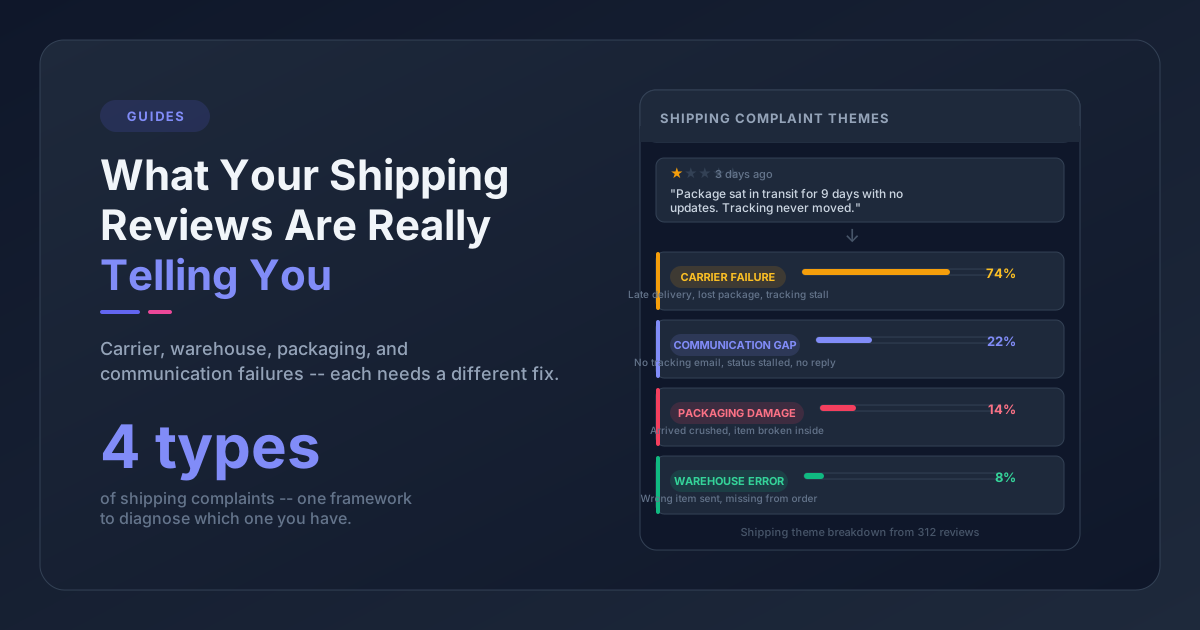
Support tickets reveal a different set of pain points. Customers contact support when something went wrong enough that they needed help. The pain points here skew toward the operational side: shipping problems, order errors, account issues, return friction. Your helpdesk (Gorgias, Zendesk, eDesk, Freshdesk) has logged every problem your customers ran into.
Importantly, support ticket pain points often don't show up in reviews. Customers who contact support and get helped often don't leave a negative review at all - which means relying on reviews alone systematically undercounts operational issues.
Post-Purchase Surveys
NPS, CSAT, and open-text post-purchase surveys capture pain points at a specific moment in the customer journey. They're useful because you can ask targeted questions ("what almost stopped you from buying?") and because the timing is controlled - you know when the feedback was collected relative to the purchase.
On-Site Behavior
Some pain points never make it to words. Cart abandonment on a specific product, exit intent on the size chart page, repeat searches for a product you don't carry - these are clues you'd never see in the words alone. They won't tell you why a customer is frustrated, but they'll tell you where.
The most accurate view of your pain points comes from combining at least the first three. When the same theme appears in reviews, support tickets, and survey responses, you can be nearly certain it's real.
A Step-by-Step Method to Extract Pain Points From Your Own Data
Here's a process that works whether you have 200 reviews or 20,000. The principles are the same.
Step 1: Collect the Last 90 Days of Feedback
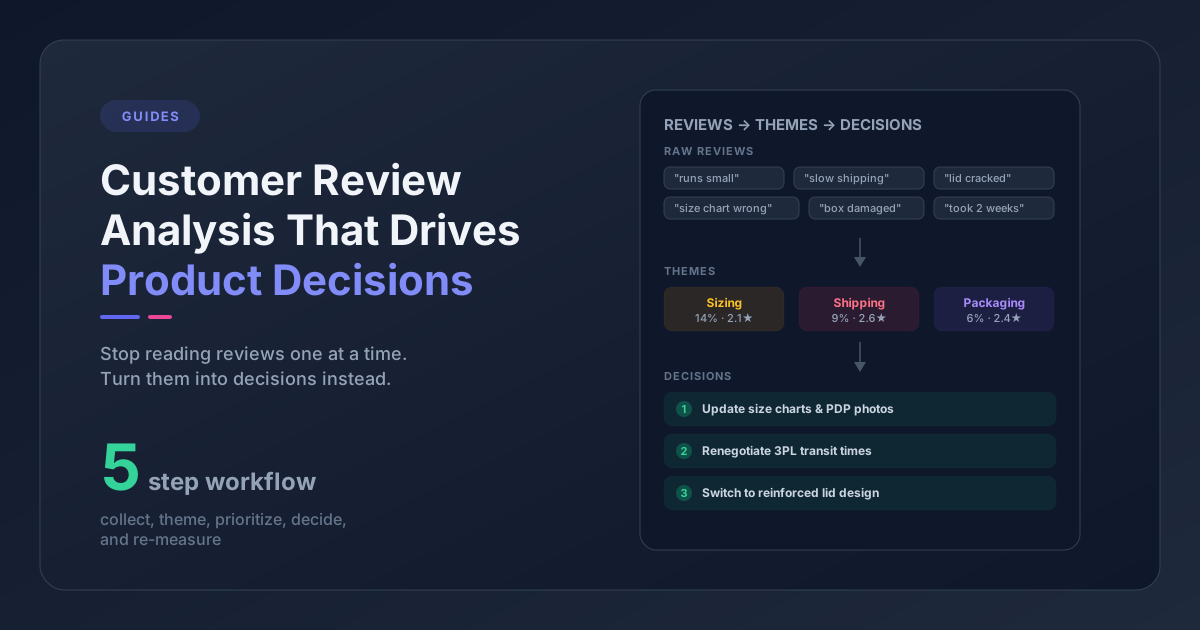
Pull reviews, support tickets, and any survey responses from the last 90 days into one place. Ninety days is the sweet spot - long enough to get statistical weight, short enough that the feedback reflects your current state (same suppliers, same packaging, same team).
If you're working manually, a spreadsheet with columns for date, source, product, rating (where applicable), and text is enough to start.
Step 2: Tag a Sample With 10 to 15 Theme Categories
Don't try to tag everything at once. Start with a sample of 100 pieces of feedback and define your themes inductively - meaning, read the feedback first and let the categories emerge, rather than imposing a list of themes in advance.
Typical ecommerce theme categories end up looking something like:
- Product quality / durability
- Sizing and fit
- Material or texture
- Packaging and presentation
- Shipping speed
- Shipping damage
- Order accuracy
- Customer service responsiveness
- Return and refund process
- Price and value
- Instructions and setup
- Product performance vs. expectations
Keep your list between 10 and 15 categories. More fragments the data. Fewer makes the categories too broad to be actionable.
Step 3: Score Each Theme on Frequency and Severity
For each theme, count how many pieces of feedback mention it and calculate the share. Then note the average star rating (or CSAT score) of feedback that mentions it. A theme that appears in 18% of feedback and pulls the average rating down by a star is high-priority. A theme that appears in 2% of feedback but only costs half a star is almost certainly not worth chasing first.
Step 4: Split Brand-Wide From Product-Specific
Some pain points affect every SKU you sell - usually operational issues like shipping speed or packaging. Others are tied to specific products - usually design, fit, or material issues. Split your list into two buckets because the owners are different. Brand-wide pain points go to operations or logistics. Product-specific ones go to merchandising or product development.
Step 5: Cross-Reference With Business Metrics
For your top five pain points, check the adjacent business metrics. Does the product with the "sizing" pain point have an above-average return rate? Does the support theme about "order errors" correlate with a drop in repeat purchases from affected customers? This cross-reference is what converts "problem to fix" into "problem worth fixing."
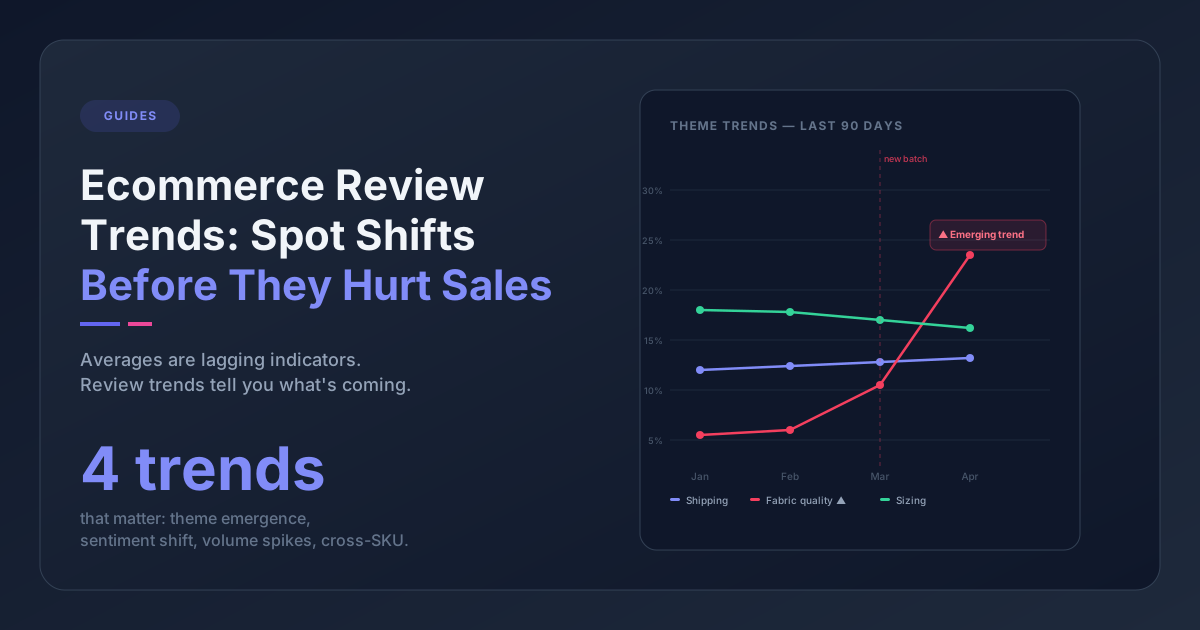
Step 6: Re-Run Monthly
Pain points shift. A supplier change can introduce a new quality issue in a month. A 3PL switch can change shipping complaints overnight. Running this analysis once isn't enough - the teams that get ahead of pain points do some version of it on a monthly cadence.
Categories of Pain Points Ecommerce Teams Commonly Miss
Even teams that do this kind of analysis systematically tend to miss a few categories because they don't show up in obvious places.
Pre-purchase friction. Customers who didn't buy don't leave reviews. You'll see this only in behavioral data, abandonment surveys, or live-chat logs before purchase. If you're only analyzing post-purchase feedback, you're missing the pain points that cost you the sale.
Silent attrition. Customers who had a bad experience and just left - no review, no ticket, no survey response - are invisible to this kind of analysis. The best proxy is cohort-level repeat purchase rates. If one product's repeat rate is materially lower than your store average, there's a silent pain point there.
Gift and recipient friction. When the buyer isn't the end user, pain points can hide because the person with the problem isn't the one who has the account or writes the review. Watch for gift-related themes in support tickets and one-off reviews from non-account-holders.
Packaging and unboxing. Customers rarely open a support ticket about packaging, and they don't always mention it in reviews. But when packaging pain points compound with product pain points, they push customers from "neutral" to "negative" in a way that distorts your product-level metrics.
Making Pain Point Analysis Continuous
Tagging feedback by hand is fine for a sample, but it doesn't scale. Most ecommerce teams that take this seriously end up with one of three setups:
- Manual sampling. Tag 100-200 pieces of feedback per quarter, treat it as directional rather than exhaustive, and use the results to guide product and ops conversations.
- Keyword dashboards. Build search queries for common pain point phrases ("broke," "returned," "doesn't fit," "arrived late") and track frequency over time. Directional, but brittle.
- AI-driven theme extraction. Tools that read across reviews and support tickets and group the complaints for you. This is what Pattern Owl does. Connect Judge.me, Yotpo, RaveCapture, Gorgias, or Zendesk, and you see a ranked list of what's actually hurting your store - which themes are getting louder, which ones are pulling ratings down, and which products they're tied to. No tagging by hand.
Pattern Owl is an AI feedback intelligence platform built for ecommerce that connects to Judge.me, Yotpo, RaveCapture, Gorgias, Zendesk, and eDesk, extracts pain-point themes automatically, and tracks how they shift across products and time.
The approach matters less than the consistency. A team that does manual analysis every month will outperform a team that buys expensive software and only looks at it quarterly.
Frequently Asked Questions
What's the difference between a customer complaint and a pain point?
A complaint is an individual instance of dissatisfaction. A pain point is a recurring pattern of complaints that describes a systemic issue. You can ignore most individual complaints. You can't ignore pain points without it showing up in your return rate, repeat purchase rate, or support volume.
How many pieces of feedback do I need for this to be meaningful?
You need at least 50 reviews per product for product-specific pain points, or 200+ pieces of feedback for brand-wide patterns. Below these thresholds, outliers distort the picture too much.
Should I focus on negative feedback only?
No. Three and four-star reviews are often the most diagnostic because they describe specific trade-offs ("great fit but the fabric piles after two washes"). Limiting analysis to one and two-star feedback misses half the useful detail and biases you toward a worst-case view of your store.
Can I trust AI to categorize pain points correctly?
Modern AI theme extraction is more consistent than manual tagging, but it's not perfect. Always spot-check the categorization on a sample. The strongest approach is AI for scale plus human review for nuance - not one or the other.
How do I prioritize which pain points to fix first?
Prioritize by multiplying frequency × severity × leverage. The top pain point is the one that (a) affects the most customers, (b) drags ratings or CSAT down the most, and (c) has the clearest path to a fix that would move a business metric like return rate or repeat purchase rate.
The Takeaway
Generic pain point lists make for easy reading and useless decisions. The pain points hurting your store right now are the ones written into your own reviews, support tickets, and surveys - and they're probably different from the ones you'd guess.
If you do nothing else after reading this, do the thing from step 1: pull 90 days of feedback into one place and tag a sample. Two hours of that exercise will almost certainly turn up a pain point you didn't know existed. From there, the question shifts from "what are our customers saying?" to "which of these are we going to fix this quarter?" - which is a much better question to be asking.
Or if two hours of spreadsheet work isn't the shape of your week, see what Pattern Owl does with 90 days of your feedback in about ten minutes.