Customer reviews analysis is the process of turning unstructured review text into themes, ranked priorities, and specific product or operational decisions. It answers one question: of all the things customers complain about, which two or three should we fix this quarter?
The 5-step workflow below collects reviews, groups them by theme, ranks themes by frequency and severity, links each theme to a decision owner, and re-measures after the fix.
If you run an ecommerce store on Shopify, BigCommerce, WooCommerce, Magento, Volusion, or anything else, you have more customer reviews than you know what to do with. The hard part is not collecting them. It's running customer review analysis that actually changes what you ship, what you stock, and how you support the people buying from you.
Most teams stop after the dashboard. They check the average rating, scan the most recent five-star reviews, archive the angry ones, and move on. That's not analysis. That's reading.
This guide walks through the workflow real ecommerce teams use to turn review data into product decisions. You don't need a data team to run it.
What Is Customer Review Analysis?
Customer review analysis is a 3-layer process: tracking review metrics (Layer 1), grouping reviews into themes (Layer 2), and assigning each high-priority theme to a decision owner (Layer 3). Most teams only do Layer 1.
Layer 1 - The metrics layer. Average star rating. Volume of reviews per week. Percentage of 1- and 2-star reviews. It tells you how you're trending, but it doesn't tell you what to fix.
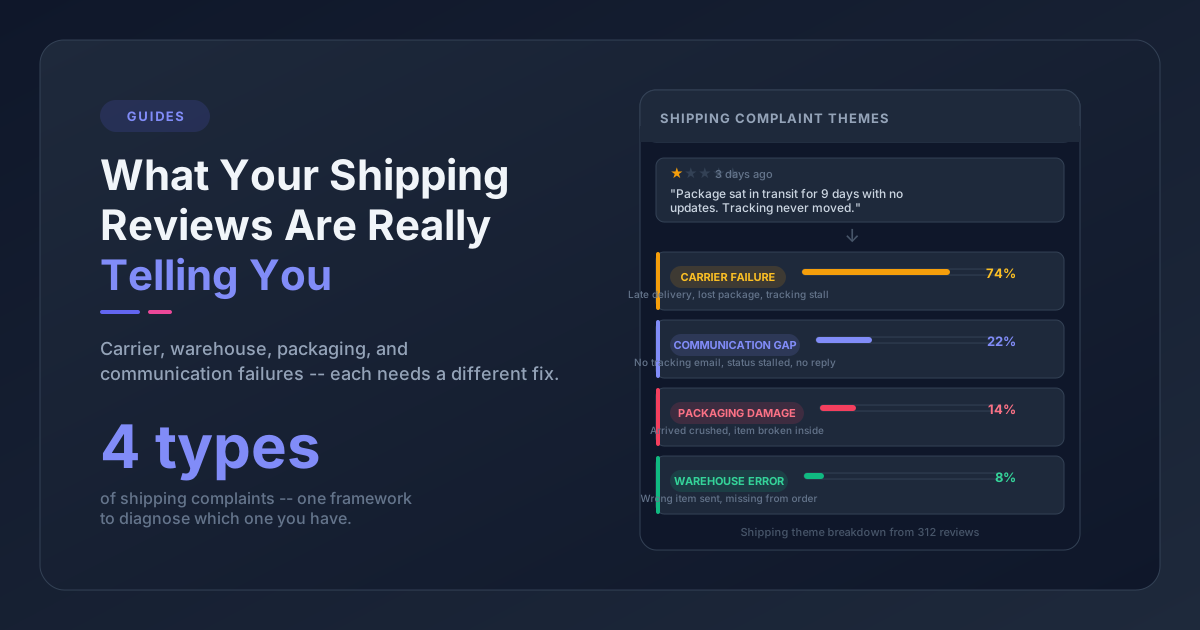
Layer 2 - The theme layer. Group reviews by what they're about. "Sizing runs small" is a theme. "Slow shipping" is a theme. "Packaging arrives damaged" is a theme. This is where customer review analytics starts paying off, because themes can be counted, prioritized, and assigned to a person.
Layer 3 - The decision layer. Each high-priority theme links to one of three owners: a product change, an operational change, or a CX response (better PDP copy, FAQ updates, post-purchase email tweaks). If a theme doesn't have an owner, it doesn't get fixed.
Most ecommerce dashboards show Layer 1. A handful of tools attempt Layer 2. Almost nobody does Layer 3 systematically. That's the gap.
Why Most Review Analysis Stops at the Dashboard
There are three structural reasons teams stall at the metrics layer.
The first is volume. According to BrightLocal's 2024 consumer review survey, 99% of consumers read online reviews before purchasing. The flip side is that brands are drowning in them. A mid-sized ecommerce store can collect thousands of reviews per quarter across Judge.me, Yotpo, Loox, Stamped, Google, and Amazon. No human is reading all of them with intent.
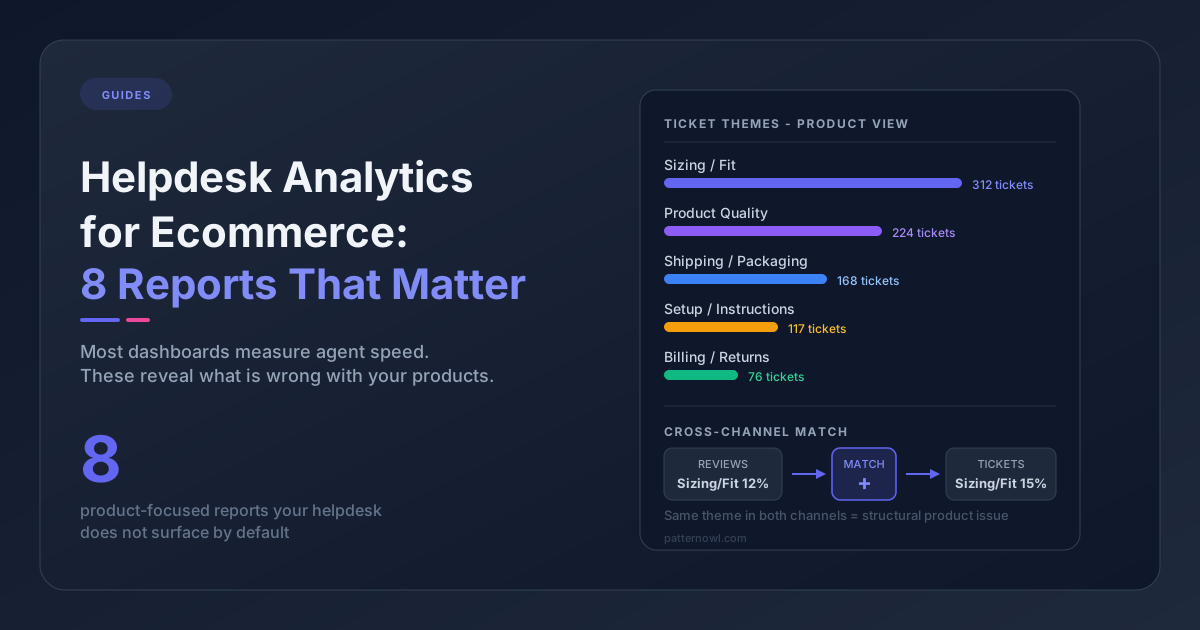
The second is fragmentation. Reviews live in your review platform. Returns reasons live in your OMS. Support tickets live in Zendesk or Gorgias. The same customer complaint shows up in three places using three different words. Pattern detection requires merging the sources first, which most teams never get around to.
The third is framing. Most "review analysis" features built into review platforms are tuned for marketing - which reviews to feature on PDPs, which to syndicate to Google. They were not built to drive product decisions. The data is there, the tools just aren't pointed in the right direction.
The 5-step workflow below fixes the framing.
The 5-Step Customer Reviews Analysis Workflow
This is a process, not a software list. You can run it in a spreadsheet at low volume or with an AI-powered review analysis tool at high volume. The steps are the same.
Step 1: Collect Everything in One Place
Pull every review into a single working dataset. That includes:
- Reviews from your primary review platform (Judge.me, Yotpo, Loox, Stamped, Okendo, etc.)
- Marketplace reviews (Amazon, eBay, Walmart, Etsy, where applicable)
- Google Business and Trustpilot
- Mentions in support tickets that are essentially review text ("The product I bought is broken")
- Returns reasons from your OMS
You don't need a fancy data warehouse. A CSV export per source, dropped into a Google Sheet with consistent columns, is enough to start. Required columns at minimum: review ID, product name or SKU, rating, review text, review date, and source.
The goal at this step is not to analyze yet. It's to make sure your analysis isn't biased by which platform you happened to look at first.
Step 2: Theme Extraction (Group Reviews by Topic)
This is the step everyone skips, and it's the most valuable one.
A theme is a recurring topic across reviews, expressed in different language. "The lid cracked." "Cap broke after a week." "Hinge snapped during shipping." Three reviews. One theme: packaging durability.
You have three options for theme extraction:
| Method | Volume that fits | Cost | Speed |
|---|---|---|---|
| Manual spreadsheet tagging | Under ~200 reviews | Free | Slow (hours) |
| Keyword clustering in Excel/Sheets | A few hundred to a couple thousand | Free | Medium |
| AI theme extraction | Anything past that | $-$$ | Fast (minutes) |
Manual tagging works fine if you have time and a small dataset. You read each review, assign 1-3 tags, and roll them up. The output is high quality but it doesn't scale.
Keyword clustering uses formulas to flag reviews containing terms like "shipping," "size," "broken," "color." It's faster but it misses synonyms. "The fit is wrong" and "it doesn't match the size chart" describe the same problem in different words.
AI theme extraction reads the actual semantic content and groups reviews automatically. The good versions handle synonyms, negations ("the box did not protect the product"), and product-specific language. The mediocre versions group everything into vague buckets like "general feedback."
Whichever method you pick, the output of Step 2 should be a count: theme name, theme definition, number of reviews mentioning it, average star rating of those reviews, and date range. That's your raw material for Step 3.
Step 3: Prioritize Themes by Frequency × Severity
You'll likely end up with 20 to 40 themes. You can't act on all of them. Pick three to five.
The simplest prioritization formula is two numbers multiplied together:
- Frequency - how often does this theme appear (% of reviews mentioning it in the last 90 days)
- Severity - how bad is the average rating when it appears (1-5 stars, lower = worse)
A theme that shows up in 18% of recent reviews with an average rating of 1.8 stars is a four-alarm fire. A theme that appears in 4% of reviews with an average of 3.9 stars can wait.
For ecommerce specifically, weight three theme types higher than their raw frequency suggests:
- Returns-correlated themes - sizing, fit, defects. Every return costs you product, return shipping, and restock labor, so a small frequency bump still moves real dollars.
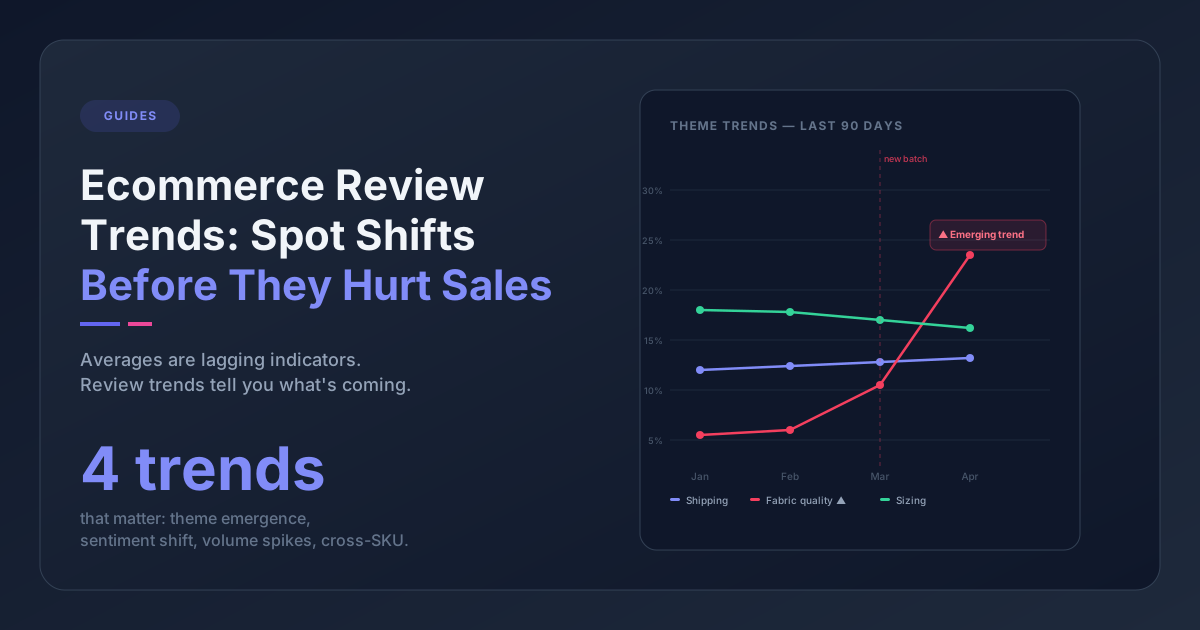
- Newly emerging themes - a theme that was 2% of reviews last quarter and 9% this quarter. Something changed. Find out what.
- Product-specific themes - if a single SKU accounts for most of the complaints, the fix is targeted, not brand-wide. Worth a deep dive.
Output of Step 3: a ranked list of three to five themes with stats attached.
Step 4: Link Each Theme to a Product Decision
Every prioritized theme gets exactly one of three labels.
Product change - the physical product, packaging, or design needs to change. Example: "lid cracks during shipping" → switch to a stronger cap or add foam padding. Owner: product or ops lead.
Operational change - something outside the product is causing the complaint. Example: "ships slowly during sales" → renegotiate with the 3PL or stage inventory closer to demand centers. Owner: ops or fulfillment lead.
CX response - the product is fine, but customer expectations aren't being set. Example: "the color is darker than the photo" → reshoot product photography under neutral lighting and add a color disclaimer to the PDP. Owner: marketing or merchandising.
The discipline here is one decision per theme, one owner, one deadline. If a theme has multiple owners or no owner, it won't get done. If you can't pick a label, the theme is too broad, go back to Step 2 and split it.
This step is what separates customer experience analysis from a dashboard. Customer experience analysis lives or dies at this step: the dashboard shows what; the analysis produces who, when, and how.
Step 5: Close the Loop and Re-Measure
This is the step almost no team does, which is why review themes recur quarter after quarter.
For each fix, set a re-measurement date 30 to 90 days later. On that date, ask one question: did the theme's frequency drop? If yes, the fix worked. Document it. If no, the fix missed the actual root cause, and you need to dig back into the reviews.
Closing the feedback loop is also where you respond to customers individually. Customers who left negative reviews about the packaging cracking want to know you fixed it. A short email saying "we changed the packaging because of your feedback" is one of the highest-ROI customer retention plays in ecommerce. It costs nothing and it creates word-of-mouth.
The output of Step 5 is a permanent log: theme, hypothesis, fix, before/after frequency, customer responses sent. After two or three quarters of this, your team has a track record of changes driven by the data, and the company starts to believe the analysis matters.
Tools That Match Each Step
You don't need software to run this workflow. You do need software to run it at scale.
- Step 1 (Collect) - Most teams use a Google Sheet, Airtable base, or BigQuery if they're already set up. Review platforms (Judge.me, Yotpo) export CSVs. Helpdesks (Zendesk, Gorgias, eDesk) export tickets.
- Step 2 (Categorize) - Manual: Sheets. Semi-automated: Excel formulas with keyword lists. Automated: dedicated theme-extraction tools, or a unified review and ticket analytics platform like Pattern Owl that handles theme extraction across reviews and support tickets in one place.
- Step 3 (Prioritize) - A pivot table or a ranking column in your Sheet works fine. Some platforms generate prioritized signal lists automatically.
- Step 4 (Link to decisions) - Whatever your team uses for project tracking: Asana, Linear, Notion, Monday. The point is the decision lives in the same place as your other work, not in an analytics tool.
- Step 5 (Close the loop) - Calendar reminders. A simple "review themes - 30 day check-in" recurring meeting beats any software.
The category of tooling matters less than whether the workflow runs every quarter without someone having to push it. Pick something light and repeatable.
What Are Common Customer Review Analysis Mistakes?
A few patterns we see repeatedly:
Analyzing reviews in isolation from tickets. Reviews are the highlights reel. Support tickets are the unfiltered version. If you only analyze reviews, you'll miss themes that customers are too polite to publish - and you'll undercount severity. Pull both into the same theme analysis.
Treating star rating as the goal. Average rating is a lagging indicator and it's heavily anchored by old reviews. A theme can be growing fast and barely move the average rating for months. Track theme frequency over time, not just rating.
Picking too many themes to fix. Five is a maximum, not a minimum. Most teams pick 12 priorities and finish two. Pick three priorities and finish three.
Skipping Step 5. If you don't re-measure, you don't know if the fix worked, and you'll re-fix the same theme next quarter. This is the most common failure mode by a wide margin.
Letting one angry customer drive the agenda. A single 1-star review describing a vivid problem is not a theme. A theme requires multiple, independently written reviews. Use frequency thresholds. We recommend at least 5 reviews or 2% of recent volume, whichever is higher.
Frequently Asked Questions
How long does customer review analysis take?
For a single product with 100-500 reviews, the manual workflow takes 4-6 hours: 2-3 hours to read and tag, 1 hour to count and prioritize, 1-2 hours to write up decisions. With AI theme extraction, the same dataset takes 15-30 minutes. The bottleneck is rarely the analysis itself, it's the discipline to act on what you find.
How many reviews do I need before review analysis is worth doing?
You need at least 50 reviews per product to spot themes reliably, and 200+ across your catalog to prioritize confidently. Below 50 reviews, individual reviews carry too much weight and you'll mistake noise for patterns. If you're below threshold, focus on collecting reviews first and run the analysis quarterly.
What's the difference between customer review analysis and sentiment analysis?
Sentiment analysis labels reviews as positive, negative, or neutral. Customer review analysis goes further: it identifies what each review is about (theme), how often that theme appears, how severe it is, and what to do about it. Sentiment is one input to the analysis, not the whole thing.
How often should ecommerce teams run customer review analysis?
Quarterly is the right cadence for most ecommerce stores. Monthly produces too much noise (themes don't shift fast enough to justify the work). Annually misses emerging issues until they've already cost you sales. Set a recurring 90-day check-in and a 30-day re-measurement after each fix.
What to Do This Week
If you're starting from scratch, do not try to build the whole workflow at once. Three steps for the next seven days:
- Pick one product. Pull every review for it from every source you have. Aim for at least 100 reviews. You'll learn the workflow on a contained dataset before scaling.
- Run Steps 1-3 manually in a Sheet. Tag every review with a theme. Count themes. Pick the top three.
- Pick one theme to act on. Assign it to one person. Set a 30-day re-measurement reminder.
That's it for week one. The full 5-step process scales naturally from there - and once your team has run it once on one product, running it across the catalog is a tooling problem, not a process problem.
The teams that ship the best ecommerce experiences are not the teams with the most data. They're the teams with the simplest, most repeatable workflow for turning the data into decisions. Customer review analysis is one of those workflows. Run it badly and your reviews are noise. Run it well and they become the highest-leverage feedback channel you have.