You closed 1,800 tickets last month. Your CSAT dashboard says 4.4. Your first-response time is trending the right direction. Your weekly ops review moves on.
But somewhere in those 1,800 tickets is a pattern - a defect concentrated in one SKU, a shipping partner that's slipping, a page on your site that's quietly misleading people - and nobody on your team has read enough of them to see it. The agents closed them. The tags don't tell the story. The insight is sitting there, locked inside a helpdesk you're paying for.
This is the guide for teams who have the ticket volume but not the analysis habit. Below is a 5-step framework for how to analyze support tickets for product insights in ecommerce - one that works whether you're on Gorgias, Zendesk, eDesk, Freshdesk, or Help Scout, and whether you have one CX agent or ten.
Why Support Tickets Are Your Most Underused Product Data Source
Reviews are louder. Surveys are cleaner. But tickets are different in one important way: they're filed by customers who had a specific, concrete problem and cared enough to do something about it.
That's a filter most data doesn't have. A product review can be about vibes. A survey response can be box-checking. A ticket is almost always evidence of a real friction point, with the SKU, order date, channel, and (often) a photo attached.
Three things make ticket data especially valuable for product decisions:
- They surface defects early. Before reviews come in (post-delivery), tickets have already been filed (at purchase, during transit, on first use). You can catch a defect on a launch SKU 2-3 weeks before your review feed notices.
- They're tied to order data. Every ticket links back to an order, which links to SKUs, variants, shipping method, customer segment, and lifetime value. You can slice ticket themes by things reviews can't give you.
- They expose the full journey, not just the product. Packaging failures, unclear PDPs, broken tracking pages - none of that shows up in a product review, but it all shows up in tickets.
The catch: you have to actually read them at scale. Tag-based reporting alone doesn't get you there, for reasons we'll get into.
The 5-Step Framework for Turning Tickets Into Product Insights
The goal isn't a dashboard. The goal is a weekly rhythm where someone on your team walks into the product or ops review with a short list of patterns backed by ticket evidence.
Step 1: Extract themes from ticket bodies, not just tags
Ticket tags are the first thing most teams rely on. They're also the first thing that rots.
Tags are manually applied. Agents are trained on 20, use 8 regularly, and default to "Other" under load. New tags get added without retiring old ones. Two agents apply different tags to the same problem. Six months in, your tag cloud is a mix of stale categories and agent preferences - and it's not a reliable input for product decisions.
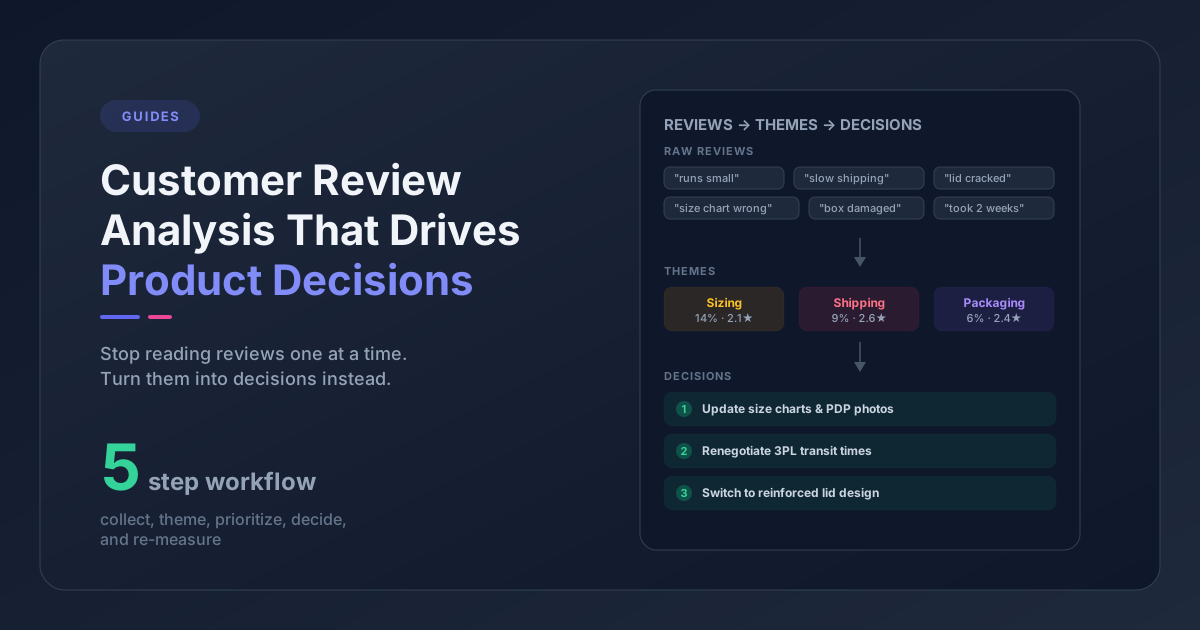
The fix is to analyze the ticket body - the actual conversation text - and extract themes directly from language. This is what modern feedback analysis tools (including Pattern Owl) do: they read the first customer message, cluster semantically similar complaints, and produce a taxonomy grounded in what customers are actually writing.
In practice this means you stop asking "how many tickets had the Shipping tag?" and start asking "what percentage of tickets in the last 30 days are about carrier delays, damaged packaging, or missing items - and which products do those themes concentrate on?"
If you're still doing this manually, pick 300 recent tickets and have one person read them end to end. It's brutal but it'll reset your intuition about what's actually happening in your inbox.
Step 2: Tie themes to SKUs and order data
Themes in isolation are interesting. Themes tied to SKUs are actionable.
Every ticket should have an associated order, and every order should have SKUs. Your analysis is only useful if you can pivot themes by product. "Shipping complaints are up 18%" is a number. "Shipping complaints are up 18%, and 40% of them reference SKU-ABC's oversized packaging" is a decision.
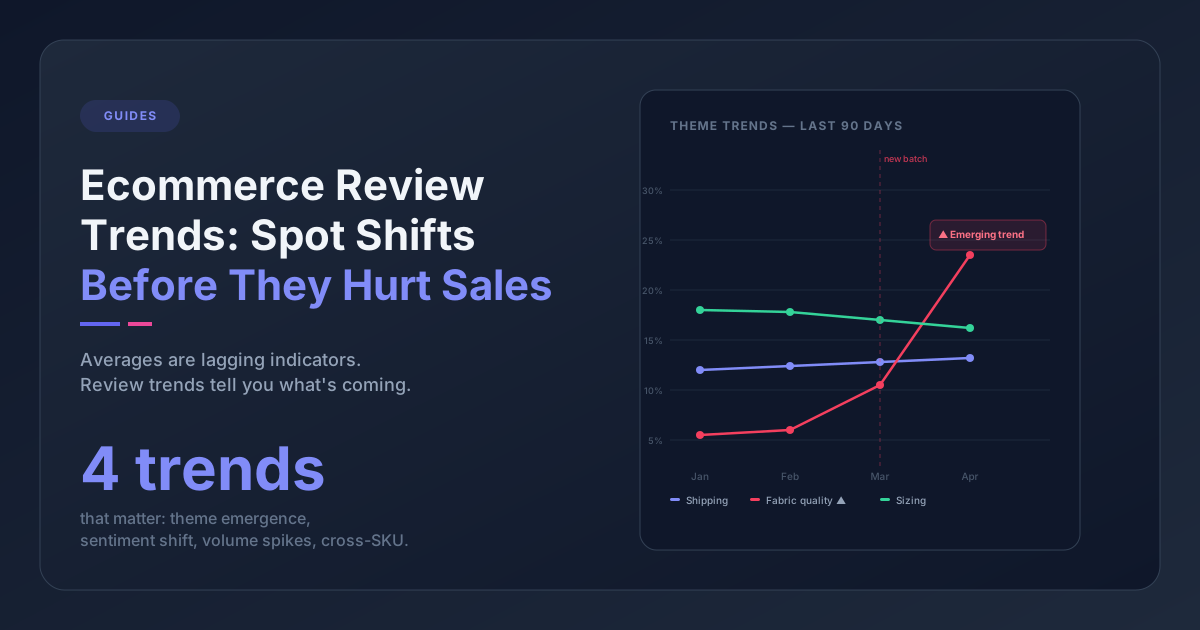
The join most teams miss: themes x SKU x time. If you can see that a theme spiked on a specific variant starting two weeks ago, you've got a near-real-time defect signal. If you can see that the same theme has been flat for six months across your whole catalog, you've got a structural process issue, not a product one.
For a manual version of this, build a pivot in Google Sheets: one row per ticket, columns for primary theme, primary SKU, and order date. Filter by theme and count SKU frequency. It's slow, but it works for one-off investigations.
Step 3: Measure CSAT drift by theme over time
Most teams report CSAT at the account level. One number, one trend line, one conversation per month.
That number is almost always a lagging indicator, and it doesn't tell you what to fix. Theme-level CSAT does.
The move is to calculate satisfaction rate per theme (rated positive tickets / total rated tickets in that theme) and track how it drifts. Example: your overall CSAT is 4.4, steady. But satisfaction on "refund processing speed" dropped from 78% to 61% over six weeks. That's the signal - and it tells you exactly where to investigate (your billing system, your refund policy, or your agent training on refund language).
Pattern Owl calculates this per theme per date range automatically. If you're doing it manually, filter your helpdesk export by theme (or tag, if that's all you have), compute positive-rating share for each week, and compare to the prior month. The themes where satisfaction is moving the wrong way are your shortlist for root-cause work.
Step 4: Cross-check ticket themes against review themes
Reviews and tickets tell different parts of the same story. A complaint in reviews is often a vaguer, after-the-fact summary. A complaint in tickets is specific and in the moment. When they both surface the same theme, that's real.
Say your review feed shows "fit runs small" as a sentiment cluster on a dress. You go to your helpdesk data and confirm that 31% of returns requests on that SKU mention sizing. Now you have a confident answer: update the size guide, add a fit photo, or tighten the pattern. You're not guessing.
Conversely, a theme in reviews that has no ticket signal often isn't actionable. Customers might complain about shipping speed in reviews while never filing tickets - because the delay wasn't severe enough to act on. That gap tells you something too.
The mechanical version of this: extract your top 10 themes from reviews and your top 10 from tickets. Any theme appearing in both lists goes to the top of your product review agenda. Themes appearing in only one get a note explaining why.
This is exactly the pattern we dig into in the guide to analyzing reviews and support tickets together.
Step 5: Route findings to product and ops with evidence attached
This is where most ticket analysis dies. The analyst finds a pattern. Product asks "are you sure?" The analyst doesn't have the receipts. The pattern fades.
Fix this by packaging every finding with:
- The theme label and definition ("Oversized packaging damage" = tickets where customer reports a dented or torn box)
- The volume and direction ("42 tickets in the last 30 days, up 60% vs prior 30 days")
- Affected products ("Concentrated on SKU-ABC, SKU-DEF - 74% of tickets in this theme")
- 3-5 verbatim excerpts (the raw customer quotes, with order dates)
- A suggested owner ("Ops - supplier conversation with carrier re: dimensional weight billing")
Evidence-backed findings get acted on. Vague trends don't.
Three Places This Framework Breaks for Real Teams
If this were easy, everyone would do it. Three common failure modes:
1. You have tag-based reporting, not theme-based analysis. If your entire helpdesk analytics setup is "tag usage over time," you will never see emerging themes, and you'll over-index on the agent-side bias of what gets tagged. Treat tags as operational metadata for routing, not as your source of truth for product decisions.
2. You don't have clean joins between tickets and products. Some helpdesks don't push SKU data into the ticket record. Gorgias pulls orders natively; Zendesk often needs a custom app. If you can't pivot theme by SKU, your insights will stop at "overall ticket volume is up," which isn't enough.
3. Nobody owns the weekly rhythm. Analysis without a meeting is noise. Pick a day. Put the CX lead, a product person, and someone from ops in a room for 20 minutes. Walk through the week's top 3 theme movements. Make a decision or explicitly punt. Do this every week for three months before you judge whether it's working.
What "Good" Looks Like at Different Scales
Different ticket volumes need different tooling and different expectations.
| Monthly ticket volume | Analysis approach | Tooling |
|---|---|---|
| Under 500 | Manual read-through once a quarter, tag-based trending | Helpdesk native reports + spreadsheet |
| 500 - 2,000 | Monthly theme review, manual or semi-automated tagging | Helpdesk + topic modeling tool or AI feedback platform |
| 2,000 - 10,000 | Weekly theme review, automated theme extraction, SKU-level pivots | Dedicated feedback intelligence platform |
| 10,000+ | Continuous monitoring with anomaly detection, product-axis signals | Platform with alerting + signal detection |
The tempting mistake at 2,000+ tickets is to hire another analyst. Usually the better move is tooling. Reading 10,000 tickets a month by eye is a losing strategy - you're looking for signal in an ocean, and human memory doesn't scale.
How to Start This Week Without Buying Anything
If you want a minimal version of this framework running by Friday:
- Export your last 90 days of tickets from your helpdesk to CSV, including subject, first customer message, order ID, SKU (if available), satisfaction rating, and created date.
- Pick 20-30 theme labels by skimming 200 tickets. Group them into 5-7 parent categories (shipping, product defect, fit/sizing, billing/refund, usage questions, etc.).
- Tag each ticket once against your new taxonomy. Yes, manually. The goal is to have one clean pass.
- Build one pivot: theme x month x satisfaction rate. Look for themes where volume is up or satisfaction is down.
- Write a one-page summary with your top 3 patterns, affected SKUs, and a proposed owner for each. Send it to your product lead. See what happens.
That's it. You'll spend maybe four hours on the first pass. You'll find things. Some of them will be embarrassing. All of them will be useful.
When the four-hour pass stops scaling - when your volume grows, or when you want to do this every week instead of every quarter - that's when it's worth looking at feedback intelligence platforms that handle this end-to-end.
The Takeaway
Support tickets are customer-reported product evidence, filed in real time, attached to orders. The only reason they're not driving product decisions at most ecommerce brands is that nobody has built the read-and-route habit around them.
You don't need perfect tooling to start. You need a weekly meeting, a rough taxonomy, and a willingness to be uncomfortable with what your customers are actually telling you.
If this guide helps, you'll probably also like the companion pieces on detecting product issues from customer reviews and the hidden cost of ignoring customer feedback.
Common Ticket Themes in Ecommerce (And What to Do With Each)
You'll find the same five or six themes dominate the top of almost every ecommerce helpdesk. What changes between brands is the concentration and the cause, not the category. Here's what we typically see, and the first move for each.
Shipping and delivery
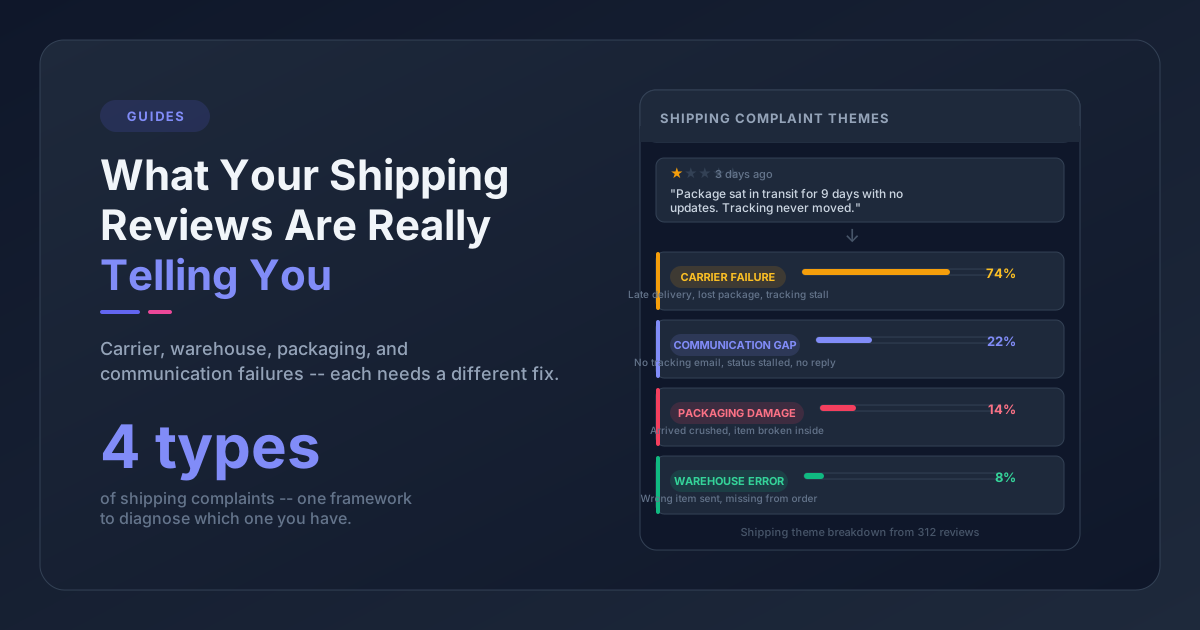
The biggest theme in most helpdesks. It splits into three sub-themes worth separating:
- Carrier delays (tracking stalled, "where is my order")
- Packaging damage (dented boxes, broken seals, crushed items)
- Lost or mis-routed shipments (package marked delivered, customer didn't get it)
The data move: segment shipping tickets by carrier, route, and package dimensions. If one carrier accounts for 60%+ of delay tickets, that's a partner conversation. If damage concentrates on one product's packaging, it's a box-spec problem for ops. Generic "shipping issues" reporting hides both.
Authoritative benchmarks on ecommerce return and delivery friction are maintained by the Baymard Institute if you want industry comparisons.
Fit, sizing, and spec mismatches
Apparel, footwear, furniture, and anything with dimensional variability. Fit tickets are almost always concentrated in 2-3 specific variants, not spread across a size range.
The data move: pivot fit tickets by SKU and variant. Look for variants where fit mentions exceed 15% of tickets on that SKU. Those are the variants that need a pattern-maker or size-grade fix, not a wholesale product rework.
Product defects
Broken on arrival, broke within X days, missing parts, wrong item shipped. The ticket volume here is usually lower than shipping, but the themes are the most product-actionable - a defect concentrated on one SKU is a near-instant roadmap or ops decision.
The data move: watch for any defect theme that spikes on a launch SKU within its first 90 days. That's a manufacturing or QA issue that needs to get to the supplier before reviews start flooding in.
Billing, refunds, and discount codes
Often dismissed as "ops problems, not product problems." But refund timing, discount code friction, and subscription billing are all parts of the purchase experience, and they show up in reviews later as "terrible customer service" comments.
The data move: track satisfaction rate on billing tickets specifically, and compare to your overall CSAT. If billing CSAT runs 15+ points below the average, you have a process or policy issue worth fixing.
Product usage and setup questions
"How do I assemble this?" "How do I wash this?" "How do I use the app?" These tickets are a gift - they're telling you exactly where your documentation, PDPs, or packaging are unclear.
The data move: every setup question over ~5 tickets on the same SKU is a PDP edit or a setup-video candidate. These are the cheapest product insights you'll ever get - the fix is content, not engineering or supply chain.
Returns and exchanges
Returns are a separate theme from shipping damage, even though they often share ticket language. A return for "didn't fit" is a product signal. A return for "arrived damaged" is a fulfillment signal. Don't collapse them.
The data move: cross-check return tickets against your ecommerce platform's return data (Shopify, BigCommerce, WooCommerce, Magento, Volusion all export this). If 40% of returns on a SKU reference the same theme (fit, color, material feel), you have a product-level issue, not a customer-level one.
Frequently Asked Questions
What's the difference between ticket tags and ticket themes?
Tags are manually applied labels from a pre-defined list (Shipping, Defect, Refund). Themes are patterns extracted from the actual language in the ticket body, without a pre-defined list. Tags are useful for operational routing; themes are what you want for product analysis, because they surface patterns you didn't know to look for.
How many support tickets do I need before it's worth analyzing for product insights?
Around 300-500 per month is where patterns become reliable. Below that, individual tickets are just anecdotes and your analysis will overfit. Above 2,000 per month, manual analysis stops scaling and you need tooling.
Should I analyze tickets and reviews together or separately?
Together. They tell different parts of the same story - tickets are specific and in-the-moment, reviews are vaguer and after-the-fact. Themes that show up in both are the most reliable product signals. We've written about this specifically in analyze reviews and support tickets together.
What ticket fields do I need for this to work?
At minimum: subject, first customer message, order ID, SKU (if your helpdesk pulls it), customer satisfaction rating, created date, and channel. Most modern helpdesks (Gorgias, Zendesk, eDesk) support all of these natively; Help Scout and Freshdesk may need a CSV export or API pull.
How often should I run this analysis?
Weekly for pattern monitoring (20-minute review of theme movement), monthly for product roadmap input (full report with SKU-level drill-downs), quarterly for strategic reviews (comparing ticket themes against review themes and return data).