Helpdesk analytics for ecommerce usually means staring at a Gorgias or Zendesk dashboard full of numbers. Average first response time. Open ticket count. CSAT score by agent. Resolution rate.
All useful metrics - if you're trying to run a support team. None of them tell you why customers are writing in, which products keep generating repeat issues, or whether a ticket theme trending up this week is the leading edge of a returns spike next month.
These 8 ecommerce helpdesk reports answer a different question: which products are quietly costing you money?
The 8 reports at a glance:
- Ticket volume by product or SKU
- Ticket-to-order ratio by product
- Theme breakdown across all tickets
- CSAT score mapped to products (not agents)
- Repeat contact rate by issue type
- First contact resolution rate by theme
- Ticket theme trends over time
- Cross-channel signal correlation (reviews + tickets)
What Standard Helpdesk Dashboards Show You
Gorgias, Zendesk, eDesk, and most other helpdesks were all built for the same job: tell a CX manager whether their team is hitting SLAs.
The default reports cover first response time, resolution time, CSAT by agent, and open/closed queue counts. Useful for staffing decisions, agent coaching, and SLA management. But all of them measure how the team responds - not what customers are actually experiencing.
If you're a founder or ops lead trying to fix the business rather than just staff the queue, this is the wrong lens. The question isn't "how fast did we answer the sizing question?" It's "why are so many customers asking about sizing for this product, and what would fix it at the source?"
The 8 Ecommerce Helpdesk Reports That Reveal Product Problems
1. Ticket Volume by Product or SKU
The simplest cut, and the one most stores skip: instead of total ticket volume, segment by the product being discussed.
You're looking for products that generate disproportionately high ticket volume relative to how much you sell of them. A SKU that accounts for 8% of your revenue but 22% of your support tickets almost always means one of four things: fit issues, unclear instructions, fragile packaging, or a misleading product page.
Gorgias makes this easier than most because it links tickets to orders automatically. Zendesk and eDesk require setting up a custom product field or pulling from order metadata. If you're working from a raw export, product names usually appear in ticket subjects or bodies.
2. Ticket-to-Order Ratio by Product
Volume by product is directionally useful but misleading when products sell at very different rates. A product generating 50 tickets a month might look alarming until you see you sold 10,000 units. Another generating 20 tickets a month could be a serious problem if you only sold 80 units.
The more useful metric: tickets opened / units sold, measured over the same window (typically rolling 30 or 90 days).
A ratio of 1 in 12 means roughly 8% of customers who buy that product contact support. If your store-wide average is 1 in 40, that product is an outlier worth investigating. This is what surfaces the SKUs quietly burning your CX team's hours.
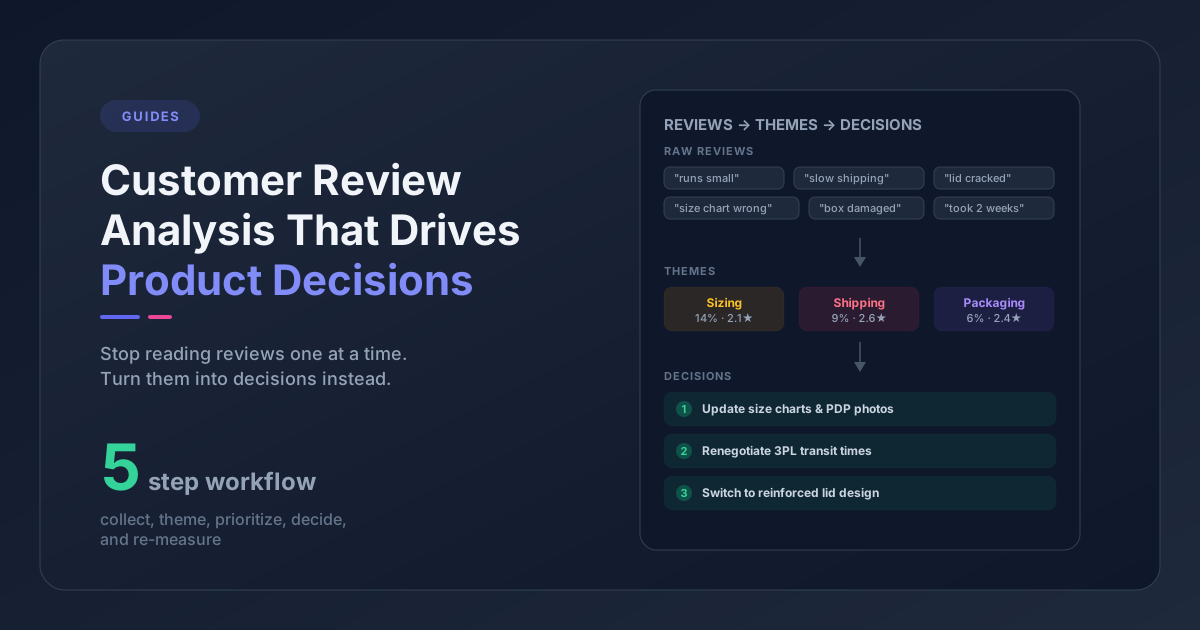
3. Theme Breakdown Across All Tickets
Ticket volume tells you how many customers have issues. Theme breakdown tells you what those issues actually are.
Most helpdesks offer tags or categories, but tags created reactively by agents are inconsistent. "Wrong item received," "fulfillment error," and "order problem" might all describe the same underlying issue. The result is 30 tags representing 5 real themes, and the report becomes unreadable.
A cleaner approach is to define a taxonomy upfront - sizing/fit, product quality, shipping/packaging, setup/instructions, billing - then either train agents to tag consistently or use a tool that extracts themes from ticket text automatically. Brands that run this exercise for the first time consistently find their actual #1 ticket theme isn't what they assumed. Take a store convinced shipping delays are its main support driver - run real theme analysis and assembly instructions might be generating 3x more contacts. Another might think negative reviews tell the full story, only to find the real issue never shows up in reviews because it happens post-purchase.
If you're starting from scratch, building a structured feedback taxonomy is worth doing once before trying to analyze ticket themes at scale. If you want to skip the manual tagging entirely, AI ticket tagging can retroactively classify your existing tickets by theme.
4. CSAT Score Mapped to Products (Not Agents)
Helpdesks default to CSAT by agent because the agent handled the ticket, so the satisfaction score belongs to the agent. That logic works for performance management - but it obscures something important.
Map CSAT scores to the product being discussed and you often see a completely different distribution. Certain products consistently produce low CSAT even when agents respond quickly and professionally - because the underlying issue is the product, not the response.
This single reframe changes what you do with low CSAT scores. Instead of sending an agent to more training, you look at whether the product itself needs to change.
5. Repeat Contact Rate by Issue Type
Some issues resolve cleanly. Others cycle - different customers, same problem, month after month. That's a signal the resolution isn't a real fix: you're patching the symptom while the root cause keeps shipping.
Calculate repeat contact rate by issue theme, not by individual customer. If your "product assembly" theme has a 38% repeat contact rate and your "order status" theme has a 6% rate, the assembly problem isn't being solved at the source. These aren't agent training problems. You can coach a perfect response script and the repeat contacts will keep coming. The fix requires improving the instructions, the packaging insert, or the product itself.
6. First Contact Resolution Rate by Theme
First contact resolution (FCR) is a standard helpdesk metric, but most teams report it in aggregate. Split it by theme and you see which issue types are structurally difficult to close in a single interaction.
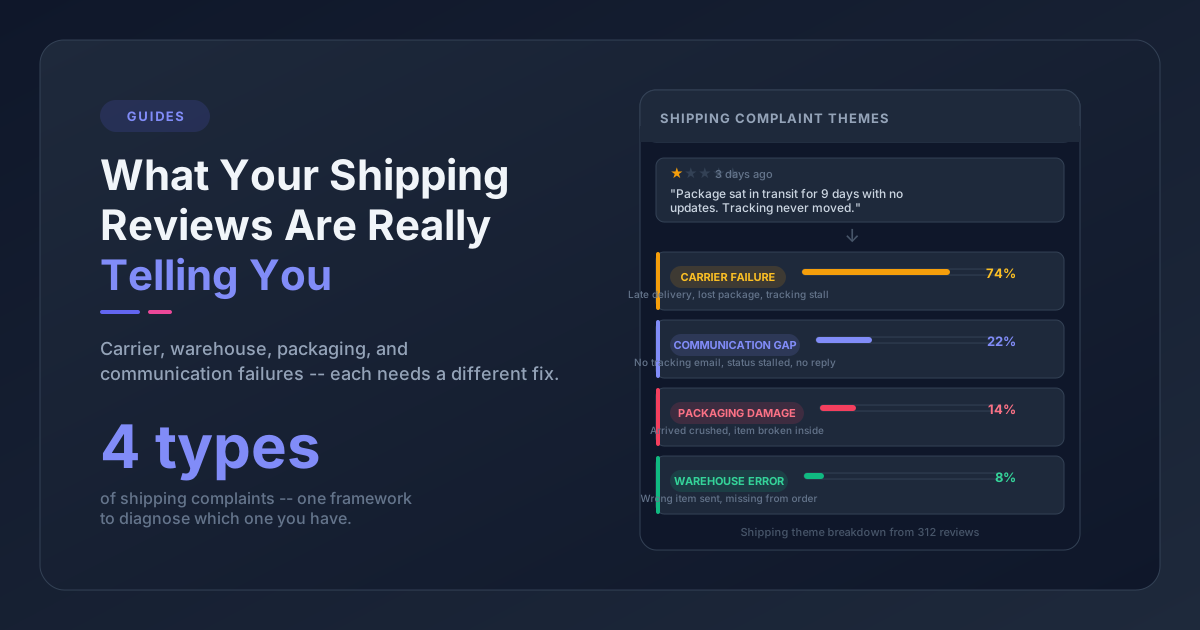
Common culprits: quality complaints (often require return or replacement flows spanning multiple contacts), technical questions (instructions unclear enough that follow-ups are almost guaranteed), and shipping damage (photo verification adds an extra exchange). These aren't agent skill problems - they're process and product problems that agent training alone won't fix. Root cause analysis is the next step once FCR by theme points you at the right category.
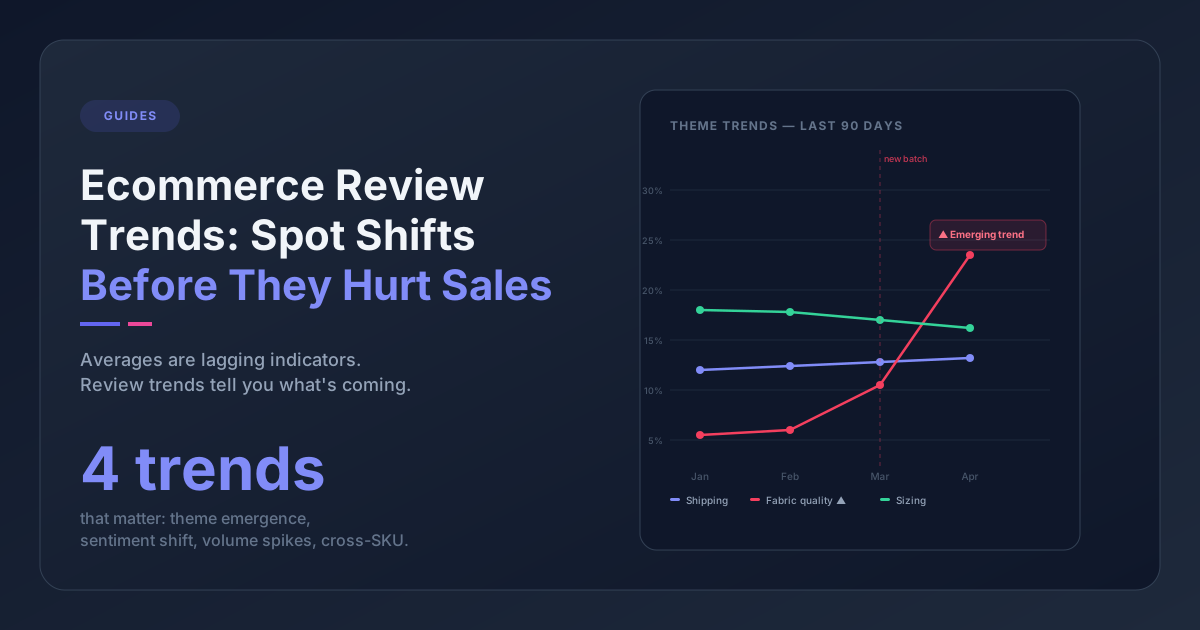
7. Ticket Theme Trends Over Time
Snapshot data shows what's happening now. Trend data shows what's getting worse.
Plot your top 5-10 themes as a time series - weekly or monthly. You're looking for three patterns:
- Rising themes: a problem that's accelerating. Worth investigating immediately. Sometimes it's a new product batch from a different supplier; sometimes it's a policy change creating confusion.
- Falling themes: a fix that worked. Useful for justifying product and CX investments.
- Seasonal spikes: themes that predictably surge at certain times of year. Useful for anticipating support load and addressing root causes before the next cycle hits.
If your catalog is seasonal or your buyers come in waves, this is the report that pays off most - the same issues resurface with each new cohort, and tracking theme trends is how you catch them early enough to act.
8. Cross-Channel Signal Correlation
This is the report most teams skip, and the one that catches product problems the other seven miss. It requires combining two data sources, which is why it doesn't get done.
The question is simple: does this ticket theme also show up in your product reviews?
A sizing complaint that appears in 15% of your support tickets and in 12% of your 3-star reviews is not a minor outlier. It's a structural issue affecting how customers experience the product before and after they buy. That double-signal warrants a product page update, a sizing chart revision, or a packaging insert - not just a macro response in your helpdesk.
Conversely, a theme that's prominent in tickets but absent in reviews often points to a post-purchase or fulfillment issue rather than a product issue. The product is fine; something in the order-to-delivery experience is breaking. Combining your review and ticket data is the fastest way to tell those two scenarios apart.
Doing this correlation manually means exporting both datasets and aligning them in a spreadsheet - which is why it rarely happens. If you don't want to live in a spreadsheet, Pattern Owl does this mapping automatically, with reviews and tickets themed and overlaid so the correlations are immediate rather than a two-hour export project.
Gorgias vs Zendesk vs eDesk: What Each Analytics Dashboard Reports Natively
Not all 8 of these ecommerce helpdesk reports are available out of the box. Here's what each platform supports without custom setup:
| Report | Gorgias | Zendesk | eDesk |
|---|---|---|---|
| Ticket volume by product | Native (order-linked) | Custom field required | Native (order-linked) |
| Ticket-to-order ratio | Export required | Export required | Export required |
| Theme breakdown | Manual agent tagging | Manual agent tagging | Manual agent tagging |
| CSAT by product | Workaround required | Custom field required | Not native |
| Repeat contact rate by theme | Not native | Not native | Not native |
| FCR by theme | Not native | Via Explore (with setup) | Not native |
| Theme trends over time | Tag trends available | Via Explore (with setup) | Limited |
| Cross-channel correlation | Not native | Not native | Not native |
For reports 3, 7, and 8, you're past what any standard helpdesk handles natively. You need either a manual export-and-spreadsheet workflow or a dedicated analysis layer that reads ticket text and surfaces themes automatically.
How to Act on a Helpdesk Report That Flags a Product Problem
Running these reports surfaces problems. Acting on them is where it falls apart.
A simple triage framework:
Size it first. What percentage of tickets does this theme represent? What's the ticket-to-order ratio for the affected product? If it's small and stable, move on. If it's growing and hitting 1 in 8 customers, drop what you're doing.
Assign clear ownership. Themes that trace back to product quality belong to the product or sourcing team. Themes about product pages belong to CX or marketing. Themes about fulfillment belong to ops. Without a named owner, nothing gets fixed.
Set a re-measurement date. Any fix should have a checkpoint 4-6 weeks out. Does the theme frequency drop? Does the ticket-to-order ratio improve? Without measurement, you're guessing. You can also reduce overall support ticket volume by fixing root causes at the product level rather than just optimizing the support workflow.
Your Tickets Are Product Feedback in Disguise
Most stores treat their helpdesk and product roadmap as if they were two different companies. Support handles the volume. Product looks at reviews and NPS. The two never talk.
The problem with that split: customers who open tickets are the ones the problem actually hurt - not the passive majority who bought, shrugged, and moved on. Ticket data is an early warning system that most ecommerce brands are ignoring entirely.
Point your helpdesk at product questions instead of just team-performance questions. The data is already in there. Most stores just never ask it the right thing.
Frequently Asked Questions
How do I find ticket volume by product in Gorgias?
Gorgias links tickets to orders automatically, so product context is available on most tickets. You can filter the Statistics view by tag or use the reporting export to segment by product. For granular SKU-level breakdowns, exporting ticket data and joining it to order data in a spreadsheet typically gives the cleanest results.
What is a good ticket-to-order ratio for an ecommerce store?
There's no universal benchmark - it varies by product complexity, price point, and category. As a starting point, any product where more than 5-8% of buyers open a support ticket warrants a closer look. Compare against your store's overall average first - relative outliers matter more than any absolute threshold.
Does Zendesk Explore support ticket theme analysis?
Zendesk Explore can report on any custom fields you've set up, including product or issue-type tags. But Zendesk doesn't automatically extract themes from ticket text - you need agents tagging tickets consistently, or an external tool that reads ticket bodies and assigns themes automatically.
Should I be analyzing reviews and support tickets together?
Yes. Reviews and tickets capture different customer segments - reviewers are often vocal customers who chose to share feedback publicly, while ticket writers are customers who hit a problem they couldn't resolve on their own. When the same theme appears in both channels, you can be much more confident it's a real product or process issue and not just noise.
How do I track ticket theme trends over time?
If your team tags tickets consistently, most helpdesks can generate trend data by tag. In Gorgias, the Statistics view shows tag volume over time. In Zendesk Explore, you can build a trend chart against any custom field dimension. If tagging is inconsistent, you'll need to either run AI theme extraction retroactively on your ticket history or export raw ticket text and analyze it monthly.
If you want to see whether the themes in your tickets also show up in your reviews - report 8 above - Pattern Owl does the cross-channel mapping automatically. Free to try.